New Appointment Management & Redesigned UI
We’re excited to announce a major update to our Appointment Module! This release introduces powerful new tools to help you manage schedules effortlessly, handle group bookings with ease, and navigate your day with a fresh, modern interface.
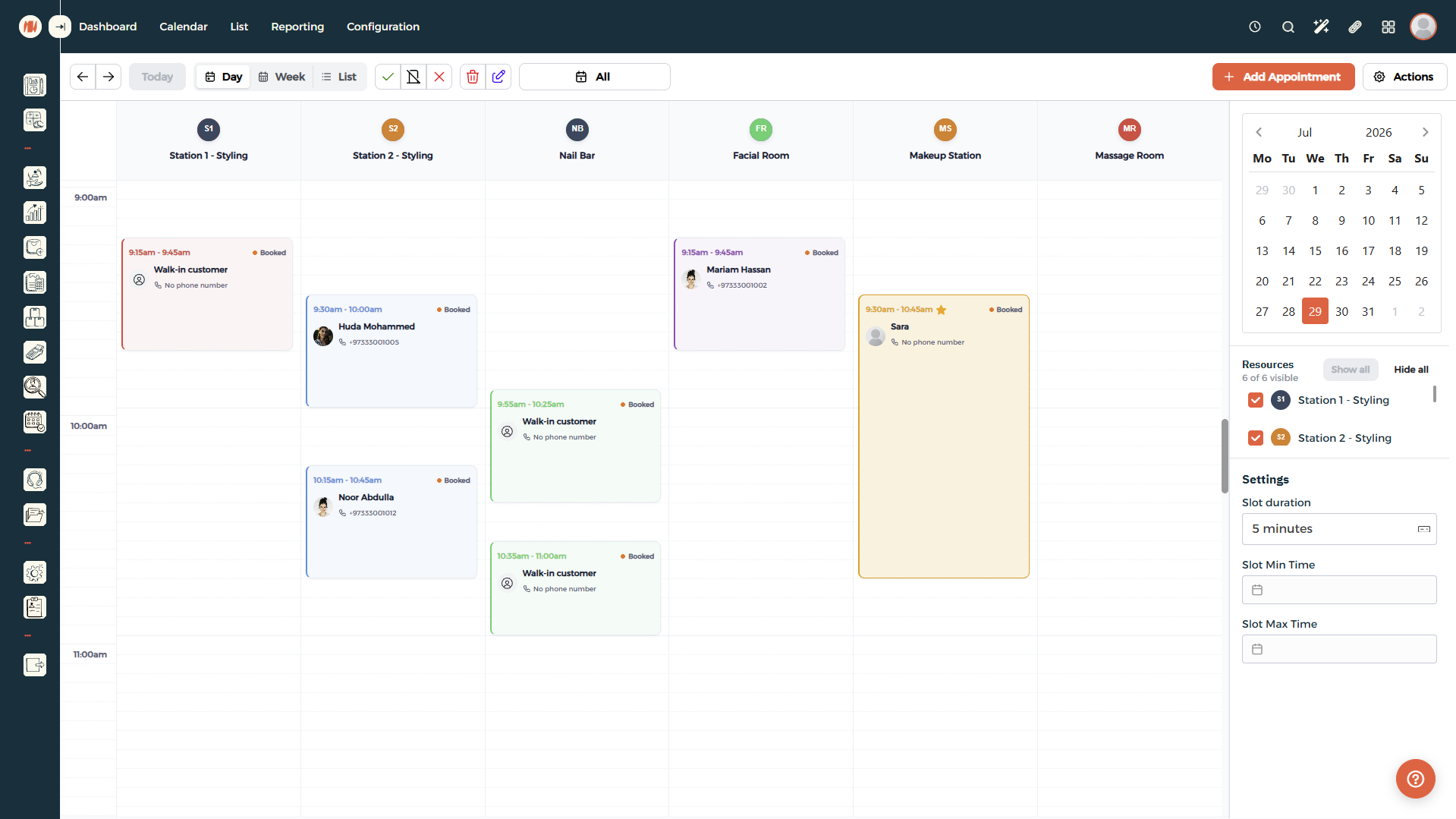
What’s New
Modernized Daily & Resource Calendar Layout
Enjoy a clean, intuitive layout built for visual clarity and speed.
- Resource Columns: Easily view schedules across specific stations or rooms side-by-side (e.g., Styling, Nail Bar, Facial Room).
- Color-Coded Statuses: Instantly identify booking states and appointment details at a glance.
- Custom Slot Duration Controls: Adjust time slots directly from the sidebar settings (e.g., 5-minute increments) to match your workflow.
Flexible Time Blocks
Easily reserve time slots for breaks, team meetings, staff unavailability, or routine maintenance.
- Prevent Overbooking: Block out time during non-clinical or administrative hours.
- Clear Schedule Visibility: Keep your team aligned on staff availability.
Multiple Appointment Views & Resource Filtering
Create and filter views to suit different workflows, departments, or locations.
- Resource Filtering: Toggle specific stations or staff members on and off using the side bar to focus only on what you need.
- Role-Based Access: Team members only see the appointment views relevant to their role.
- Smart Memory: The system automatically saves your last selected view so you can pick up right where you left off.
Individual & Group Appointments
Seamlessly organize both individual appointments and group sessions under a single booking.
- Separate Billing: Charge and invoice each customer in a group individually.
- Granular Status Tracking: Track individual attendance statuses (Attended, Missed, or Cancelled) per customer.
Instant Customer Details & History
Quickly review customer details, phone numbers, and past bookings directly within the appointment cards and booking drawer.
How to Get Started
All these features are live and ready to use immediately in your portal. Head over to the Calendar or Appointments section to explore the new layout and set up your custom views!